Diagnose connection issues with the new Connection Timeline in Codat Portal

We have added a ConnectionConnection A link between a Codat company and a data source (like an accounting platform). Each connection represents authorized access to pull or push data from that platform. Timeline drawer to the Codat Portal so you can self-serve the history of any data connectionConnection A link between a Codat company and a data source (like an accounting platform). Each connection represents authorized access to pull or push data from that platform., including when it was started, completed, deauthorized, or unlinked, without leaving the Manage ConnectionsConnection A link between a Codat company and a data source (like an accounting platform). Each connection represents authorized access to pull or push data from that platform. page.
What's new?
A new View timeline button on the Manage ConnectionsConnection A link between a Codat company and a data source (like an accounting platform). Each connection represents authorized access to pull or push data from that platform. page in the Codat Portal opens a right-anchored drawer with a per-connectionConnection A link between a Codat company and a data source (like an accounting platform). Each connection represents authorized access to pull or push data from that platform. diagnostic history. Until now, status pills told you the current state of a connectionConnection A link between a Codat company and a data source (like an accounting platform). Each connection represents authorized access to pull or push data from that platform. but not how it got there. The timeline closes that gap.
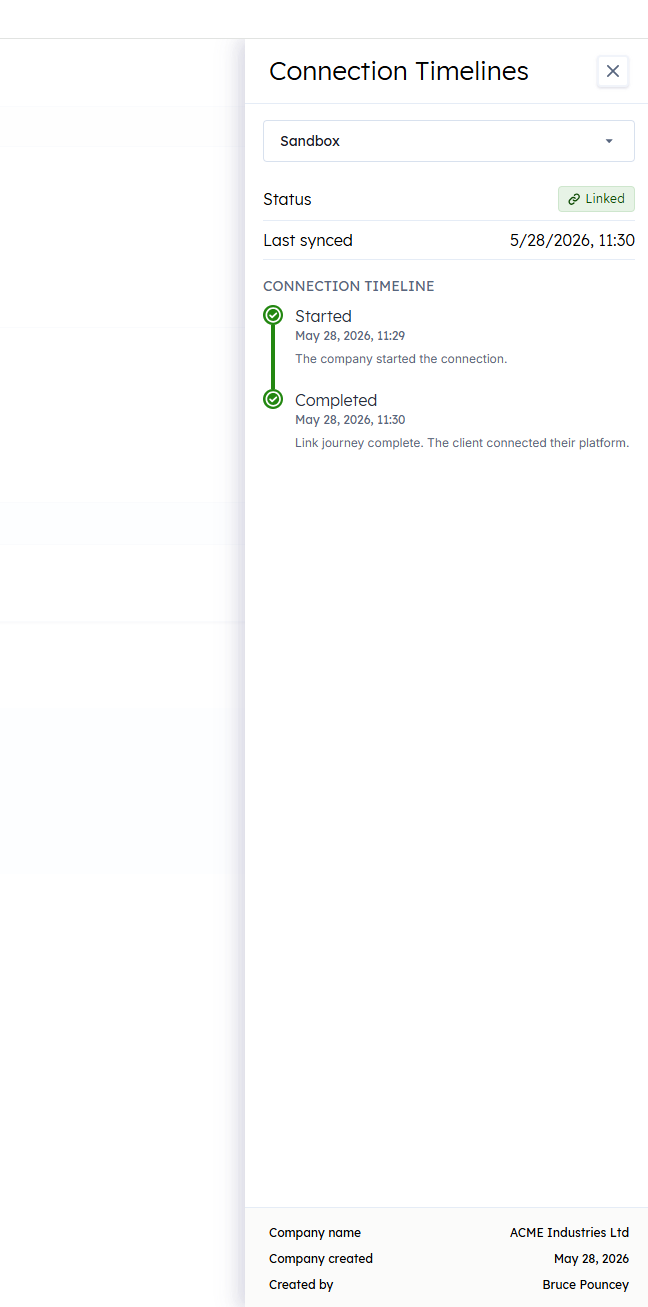
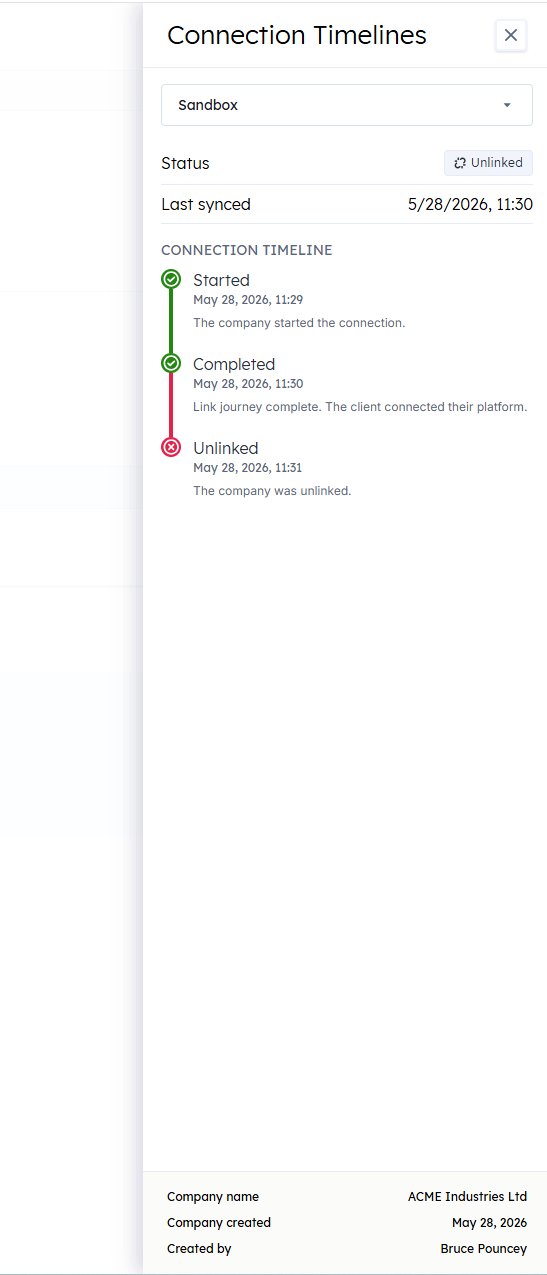
Chronological view of every status change
The drawer renders a vertical timeline of status transitions for the selected connectionConnection A link between a Codat company and a data source (like an accounting platform). Each connection represents authorized access to pull or push data from that platform., oldest at the top and newest at the bottom. Each step shows the status, the date and time of the transition, and the reason where one is available for Deauthorized and Unlinked events.
Steps map onto the connectionConnection A link between a Codat company and a data source (like an accounting platform). Each connection represents authorized access to pull or push data from that platform. statuses you already see on the table:
- Started: when the linkLink The authorization flow that allows end users to connect their accounting, banking, or commerce platforms to your application via Codat. flow began
- Completed: when the connectionConnection A link between a Codat company and a data source (like an accounting platform). Each connection represents authorized access to pull or push data from that platform. became authorized and started syncing data
- Deauthorized: when access was revoked or expired
- Unlinked: when the connectionConnection A link between a Codat company and a data source (like an accounting platform). Each connection represents authorized access to pull or push data from that platform. was manually unlinked
Switch between a companyCompany In Codat, a company represents your customer's business entity. Companies can have multiple connections to different data sources.'s connectionsConnection A link between a Codat company and a data source (like an accounting platform). Each connection represents authorized access to pull or push data from that platform. without leaving the drawer
A connectionConnection A link between a Codat company and a data source (like an accounting platform). Each connection represents authorized access to pull or push data from that platform. picker at the top of the drawer lists every connectionConnection A link between a Codat company and a data source (like an accounting platform). Each connection represents authorized access to pull or push data from that platform. on the companyCompany In Codat, a company represents your customer's business entity. Companies can have multiple connections to different data sources.. Selecting another platform replaces the timeline and status summary in place, so you don't need to close the drawer and reopen it from another row.
Current status and last syncSync The process of fetching the latest data from a connected data source. Syncs can be triggered manually or run automatically on a schedule., at a glance
Above the timeline, the drawer surfaces the connectionConnection A link between a Codat company and a data source (like an accounting platform). Each connection represents authorized access to pull or push data from that platform.'s current status as a colored pill and the last successful syncSync The process of fetching the latest data from a connected data source. Syncs can be triggered manually or run automatically on a schedule. timestamp in your locale. These values come straight from the connectionConnection A link between a Codat company and a data source (like an accounting platform). Each connection represents authorized access to pull or push data from that platform. record, so they are always present even when the underlying transition history is not.
Honest about data gaps for older connectionsConnection A link between a Codat company and a data source (like an accounting platform). Each connection represents authorized access to pull or push data from that platform.
ConnectionConnection A link between a Codat company and a data source (like an accounting platform). Each connection represents authorized access to pull or push data from that platform. transitions are only recorded from the release of this feature forward, and there is no historical backfill. ConnectionsConnection A link between a Codat company and a data source (like an accounting platform). Each connection represents authorized access to pull or push data from that platform. that have not transitioned since the recording started show a "Timeline not available" banner alongside the current status and creation date. As soon as those connectionsConnection A link between a Codat company and a data source (like an accounting platform). Each connection represents authorized access to pull or push data from that platform. next change state (a relink, a deauthorization, an unlink), the timeline starts populating itself, so coverage self-heals over time.
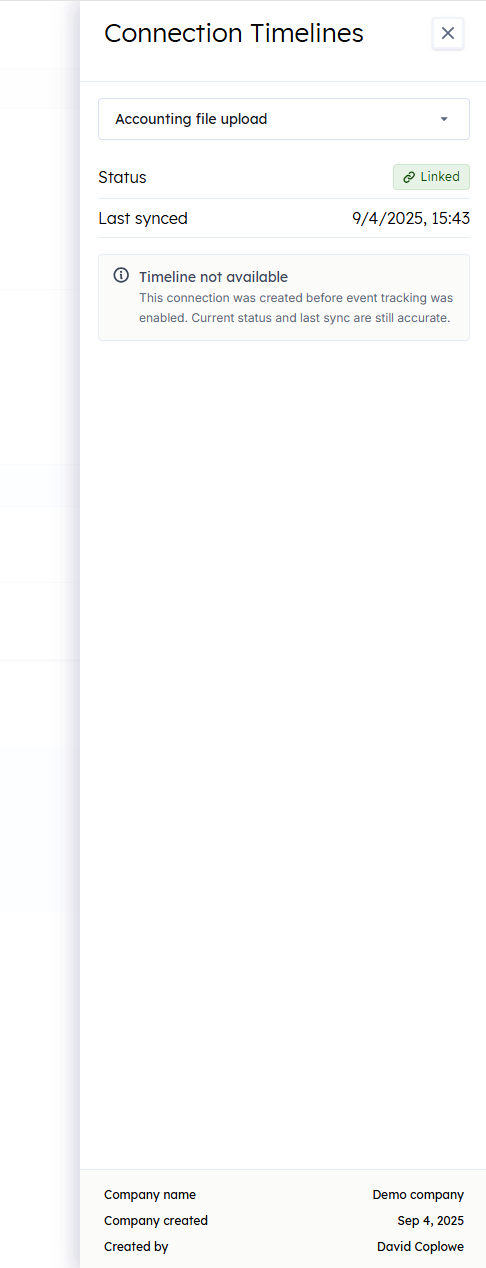
The drawer and all of its labels are available in both English and Canadian French.
Who is this relevant for?
This update is most useful for bankers, implementation managers, and support engineers who need to answer "what's going on with this connectionConnection A link between a Codat company and a data source (like an accounting platform). Each connection represents authorized access to pull or push data from that platform.?", whether that's a client reporting data isn't flowing, a status pill showing Deauthorized, or an onboarding that has stalled. It also benefits any Portal user who wants a clear audit trail of how a connectionConnection A link between a Codat company and a data source (like an accounting platform). Each connection represents authorized access to pull or push data from that platform. has changed over time.
How to get started?
No action is required to benefit from this update. Open the Companies page in the Codat Portal, pick a companyCompany In Codat, a company represents your customer's business entity. Companies can have multiple connections to different data sources., and click View timeline on any connectionConnection A link between a Codat company and a data source (like an accounting platform). Each connection represents authorized access to pull or push data from that platform. in the Manage ConnectionsConnection A link between a Codat company and a data source (like an accounting platform). Each connection represents authorized access to pull or push data from that platform. view to see its history.